When reviewing Windows event logs, administrators are often faced with an overwhelming number of events. While some events include clear and helpful descriptions, many are cryptic, poorly documented, or difficult to interpret—especially when troubleshooting complex issues.
Earlier versions of Event Log Explorer addressed this challenge by allowing users to look up additional information in public knowledge bases such as EventID or the Microsoft Events Knowledge Base. Many users relied on these integrations to better understand events during log analysis. Unfortunately, these knowledge bases are no longer available, and as a result, we recently removed their integration from Event Log Explorer.
A Modern Alternative: AI-Assisted Event Analysis
The good news is that modern large language models (LLMs) are now capable of providing meaningful explanations and troubleshooting guidance for many Windows events. We researched and evaluated several Artificial Intelligence (AI) chatbots to find the most reliable option for Windows event analysis and found that Microsoft Copilot consistently delivers the most accurate and relevant results in this area.
Microsoft Copilot is powered by advanced OpenAI GPT–class models and enhanced by Microsoft’s own adaptations. These include training on Microsoft-specific resources and optional Bing grounding, which allows Copilot to enrich its responses with up-to-date information from Bing search results. This combination makes Copilot particularly effective at explaining Windows Event IDs, audit events, and system messages.
Event Log Explorer + Microsoft Copilot
Starting with the latest version, Event Log Explorer is integrated with Microsoft Copilot, enabling AI-assisted analysis directly from your event logs.
Using this feature is simple:
- Select an event in Event Log Explorer.
- Click the AI button on the toolbar.
- A new window opens with an internal web browser that launches a Copilot chat.
- Event Log Explorer automatically prepares a prompt, for example:
“What does Audit Success Event ID 6417 from source Microsoft-Windows-Security-Auditing mean?”
The embedded browser also provides several predefined prompt buttons for common analysis tasks—just click a button to send the prompt to Copilot. You can also write your own custom prompts at any time.
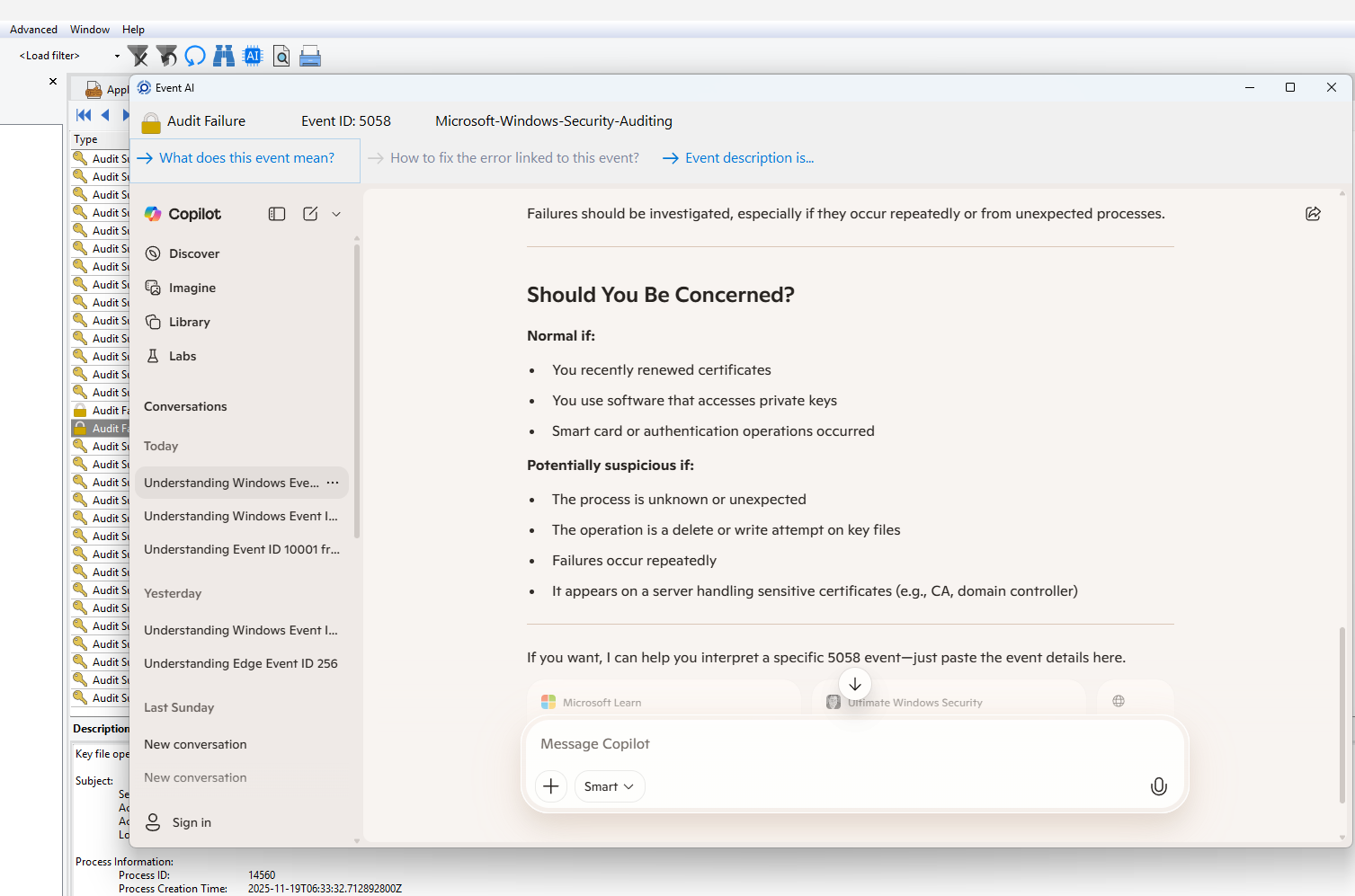
If a prompt includes event description details, they are displayed but not automatically sent. This gives you the opportunity to review and remove any sensitive information before submitting the query, helping you stay in control of your data.
Why This Matters
With Copilot integration, Event Log Explorer once again offers a powerful way to understand complex events—this time using AI instead of static, outdated knowledge bases. You can quickly:
- Understand what an event means
- Identify likely causes
- Discover possible troubleshooting steps
- Reduce time spent searching documentation manually
Conclusion
Windows event logs remain one of the most valuable—and most challenging—sources of diagnostic information. By integrating Microsoft Copilot, Event Log Explorer brings modern AI capabilities directly into the event analysis workflow. This new approach replaces discontinued knowledge bases with a smarter, more flexible, and continuously improving solution that helps administrators, security specialists, and digital forensic professionals work faster and more effectively.
👉 Download the latest version of Event Log Explorer today and experience AI-powered event log analysis with Microsoft Copilot.
Spend less time guessing what events mean—and more time solving real problems.


